On October 29, 2026, IBM pushed 33 Langflow CVE records to the public CVE list in one batch. Two of them are the worst kind: a remote attacker with no account at all can bypass authentication or run arbitrary code on the server. (source: HOL Guard, The Hacker News)
If you've ever run Langflow — the drag-and-drop tool for wiring up AI agent flows — on a version between 1.0.0 and 1.12.8, reachable from anywhere but your own machine, this one's for you.
The plain-English version
Think of Langflow as a reception lobby: every visitor gets asked to sign in before they can use anything inside.
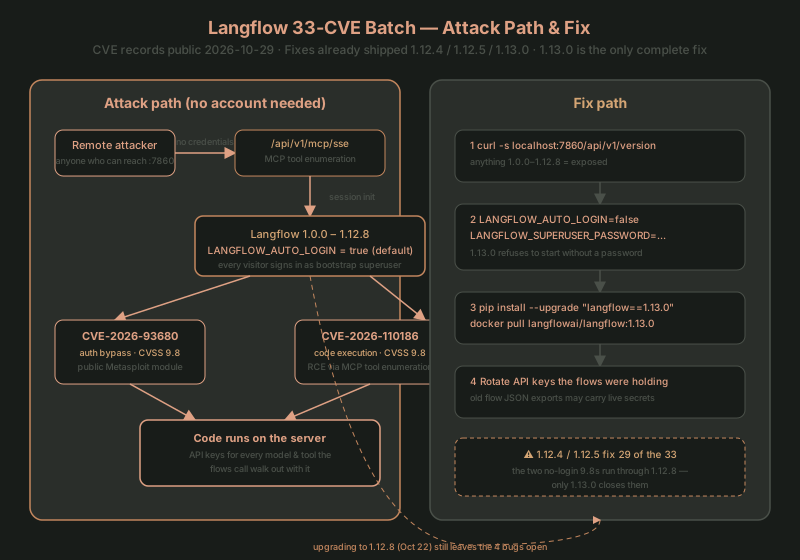
But in the 1.12.x line there's a default setting, LANGFLOW_AUTO_LOGIN=true, that changes the rules: every visitor skips the sign-in form and is admitted straight in as the most-privileged user. The source code's own description says "bypasses authentication and should only be used in development environments." (source: 1.12.8 auth.py)
So the entry point for the two 9.8s is authentication being off by default. An attacker doesn't need to guess anyone's password — they just need to reach your port 7860.
The two no-login 9.8s
| CVE | CVSS (IBM) | Account needed | What it gets you | Affected through | Fixed in |
|---|---|---|---|---|---|
| CVE-2026-93680 | 9.8 | None | Authentication bypass | 1.12.8 | 1.13.0 |
| CVE-2026-110186 | 9.8 | None | Code execution (MCP tool enumeration) | 1.12.8 | 1.13.0 |
| CVE-2026-104339 | 9.8 | None | Code execution | 1.12.3 | 1.12.4 |
None of them need a login. The first two are the nastiest of all 33, because no 1.12.x release fixes them — including 1.12.8, which shipped on October 22. (source: HOL Guard full CVE table)
CVE-2026-110186's attack surface is worth a sentence: Langflow can expose its flows as tools to MCP-capable AI apps via the Model Context Protocol. IBM's description: "unauthenticated remote code execution exploitable through model context protocol tool enumeration" — an attacker connects to the MCP endpoint, lists the tools your server offers, and walks in from there. (source: The Hacker News)
The public Metasploit module shipped before the CVE records
The timeline is a little wild:
- 2026-09-29: 1.12.4 released (clears 16 CVE IDs)
- 2026-10-06: 1.12.5 released (clears 13 more)
- 2026-10-22: 1.13.0 released (clears all the rest)
- 2026-10-23: Metasploit ships the
langflow_auth_bypass_cve_2026_93680module - 2026-10-29: IBM's 33 CVE records finally go public
The fix for the two 9.8s (1.13.0) was public only 7 days before the CVE records; the 29 fixes in 1.12.4 / 1.12.5 had been out since late September and early October. The Metasploit module landed six days before the CVE records themselves. (source: Rapid7 Metasploit wrap-up, module source)
What the module does is deliberately modest: it connects to the MCP SSE endpoint without credentials, initializes a session, pulls the server's tool list, and stores it as JSON loot. It's a recon module — it doesn't run commands on the server. The module's target range is 1.5.0–1.11.4, narrower than IBM's 1.0.0–1.12.8 (the author only verified that range; that's not a statement about versions outside it).
💡 Key point: as of the October 30 CISA KEV catalog update, neither of the two 9.8s is listed as known-exploited. Six older Langflow CVEs are on KEV (the most recent, CVE-2026-9198, was added in August). "Not on KEV yet" ≠ "not being scanned" — once a public module exists, automation starts sweeping port 7860.
Check whether you're exposed
These all work from a machine that has no Langflow session:
# 1. Version check
pip show langflow | grep -i ^version
curl -s http://localhost:7860/api/v1/version
docker inspect --format '{{.Config.Image}}' <container>
# anything 1.0.0 – 1.12.8 hits at least one of the 33

# 2. Is auto-login on?
# Open the UI in a private window: no login form, straight into the flow list = suspicious (SSO can also skip the form — a hint, not proof)

# 3. Does the MCP endpoint answer strangers?
curl --include --max-time 5 -N -H 'Accept: text/event-stream' http://your-langflow:7860/api/v1/mcp/sse
# 200 + an event stream starts = open to anyone; 401/403 = it asked for credentials (the stream cutting off after 5s is expected)

# 4. Where does 7860 listen (this box's namespace only — Docker port mappings won't show here)
ss -ltnp | grep 7860
# 0.0.0.0:7860 on a box with a public address = urgent
Risk tiers (from HOL's analysis, which I agree with):
- Move today: a Langflow server that other people can reach — a team's shared agent builder, a demo box, a container behind a load balancer with no SSO in front.
- Lower, not zero: a
langflow runsession bound to 127.0.0.1 on your own laptop (the no-login bugs need network reachability); or a single-trusted-account instance with auto-login off (that doesn't help against the three no-login CVEs). - Covered: deployments with an authenticating reverse proxy (SSO, VPN, IAP) in front of every Langflow path.
Upgrading: two traps
The fix is one thing: 1.13.0. 1.12.4 clears 16 of the IDs and 1.12.5 clears 13 more, but the two no-login 9.8s only get fixed in 1.13.0.
# pip / uv
pip install --upgrade "langflow==1.13.0"

# Docker (don't trust latest — pull the pinned tag)
docker pull langflowai/langflow:1.13.0
Trap 1: 1.13.0 turns auto-login off by default (I checked the source — AUTO_LOGIN's default flips from true to false). An instance upgraded in place from 1.12.x will refuse to start with Username and password must be set until you set a superuser password. Do it before you restart:
export LANGFLOW_AUTO_LOGIN=false
export LANGFLOW_SUPERUSER=langflow
export LANGFLOW_SUPERUSER_PASSWORD='use-a-long-random-value'
# Note: these variables must reach the environment Langflow actually reads
# (the container's env / systemd unit / .env) — setting them in your interactive shell is not enough
Trap 2: the old auto-login account already has a password. If the instance ran auto-login, the bootstrap account (langflow) already has a system-generated password and a login timestamp. Setting LANGFLOW_SUPERUSER_PASSWORD doesn't change it, and sign-in fails with Incorrect username or password. The recovery path in Langflow's docs (Recover access after upgrading):
- Turn auto-login back on briefly
- Set a password on that account via
PATCH /api/v1/users/{id} - Turn auto-login back off
- Close port 7860 to the internet while you do steps 1–3 — for those few minutes you're exposed again
⚠️ Don't reinstall to recover access: Langflow's docs explicitly warn that deleting and reinstalling Langflow can permanently remove your flows.
After the upgrade: rotate the keys
Upgrading fixes new bugs; it doesn't un-leak what's already out. Four of the batch are secret-related, and the one that matters most is CVE-2026-77817: flow / project JSON exports did not strip secrets. So:
- any JSON export made on an affected version — sitting in a repo, a ticket, a Slack thread — may carry live keys
- the API keys for the model APIs / SaaS tools your flows called should be treated as exposed if an attacker got in
- rotate, then watch the access logs. Don't just bump the version and close the tab.
Whose problem is this?
Langflow is open-source, and its CVE authority is IBM — because IBM acquired DataStax in 2024, and DataStax had acquired Langflow's original developer, Logspace. (source: The Register)
The direct takeaway for the homelab / self-host crowd: any "AI agent assembly tool" you run in Docker (Langflow, n8n, Flowise and friends) that's reachable beyond your LAN without an auth layer in front has an attack surface shaped exactly like this 33-CVE batch. An inference server (vLLM / Ollama) is "an unauthenticated HTTP proxy with a GPU"; an agent builder is "an unauthenticated HTTP proxy with all the keys your flows hold." Same pattern, different bait.
If You're Stuck
- Startup fails with
Username and password must be setafter upgrading → 1.13.0 has auto-login off by default; setLANGFLOW_SUPERUSER_PASSWORDand start again - Sign-in fails with
Incorrect username or passwordafter upgrading → that's trap 2: the old auto-login account has a generated password. Walk the recovery path (briefly re-enable auto-login →PATCH /api/v1/users/{id}→ disable again) - The MCP endpoint still doesn't ask for credentials after upgrading → on 1.12.x the endpoint answers unauthenticated connections; that's the bug, not a setting. Upgrade to 1.13.0, or close the port first
- Set
AUTO_LOGIN=falsebut old sessions still work → disabling auto-login does not revoke existing sessions / API keys; revoke them manually or wait for expiry - Docker
lateststill resolves to 1.12.x after "upgrading" →latestwas pointing at the old release; use the pinnedlangflowai/langflow:1.13.0tag - Don't know what version you're on →
curl -s http://localhost:7860/api/v1/versionis the fastest answer
Further Reading
- Inference server SSRF attack — a 12-hour in-the-wild exploit against inference servers, the other side of the same "unauthenticated proxy" pattern
- Two kernel CVEs on the same day — the same shape at the kernel layer: no login needed, just network reachability
- Why Hermes, not LangChain — choosing an agent framework; this incident is a textbook case of picking the wrong layer
Sources
- HOL Guard: Langflow 33-CVE disclosure, how to fix
- The Hacker News: Critical Langflow Flaws
- IBM security bulletin
- CVE-2026-93680 record / CVE-2026-110186 record
- Langflow v1.13.0 release / PR #14993: disable auto-login by default / PR #15789: recovery after upgrade
- Metasploit module: langflow_auth_bypass_cve_2026_93680 / Rapid7 wrap-up
- Langflow upgrade docs / Recover access after upgrading
- CISA KEV catalog