
On October 15, the Linux kernel CVE team published two critical vulnerabilities in the same day. One in the TCP protocol stack (CVE-2026-98432, CVSS 9.8). One in the network packet path (CVE-2026-99999, CVSS 9.3, dubbed "PwnEscape" by the researcher). Both had upstream fixes by early October. Neither Ubuntu nor RHEL had shipped a fixed kernel as of October 30. (source: The Hacker News, PatchMon, pwn.ai)
If you run Proxmox, VMs, or any Linux container — your machine is probably sitting on both of these.
The plain-English version
Think of your Linux kernel as a 24-hour front desk. Anyone on the network can toss a TCP packet through the window, and the desk logs them, opens a door, pours a drink.
CVE-2026-98432 is a race condition at that desk. While the desk is "registering guest A," another CPU is "re-registering the same ticket for guest B." If A's registration gets cancelled (the paper gets thrown away) while B is still reading it, B reads ink that's already on a discarded sheet — freed memory. An attacker who can trigger this race gets to peek at nearby kernel memory, and in some cases, overwrite a pointer so the kernel executes code of their choosing.
CVE-2026-99999 is subtler. The desk stamps checksums on packets. If a packet arrives with a slightly wrong "where to stamp" label, the stamp lands on the wrong field — possibly overwriting the IPv4 header itself. If the packet came from an untrusted VM, that guest just touched host kernel memory.
The common thread: the attacker doesn't need to log in. They just need network reach to your machine.
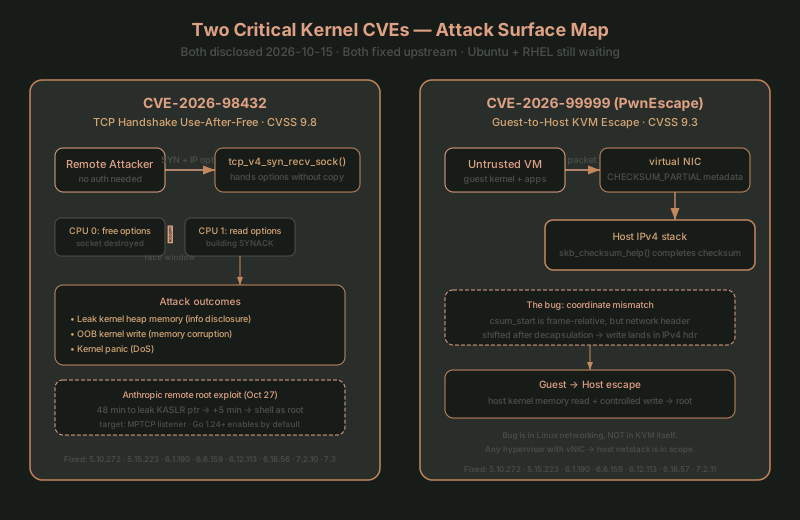
CVE-2026-98432: use-after-free in the TCP handshake
How it works
During the third step of the TCP handshake, tcp_v4_syn_recv_sock() hands the IPv4 options from the client's SYN packet to the new socket without copying them. If another CPU is simultaneously processing a retransmitted SYN for the same connection and building a SYNACK from those same options, and the new socket gets torn down first — the options are freed via kfree() while the SYNACK code is still reading them. Use-after-free.
This has been possible since Linux 4.4 (January 2016). (source: NVD, kernel commit)
What an attacker gets
The kernel CVE team lists three impacts:
- Information disclosure: stale options get copied into the SYNACK, leaking kernel heap memory over the network
- Memory corruption: a reclaimed object lets
ip_options_build()do out-of-bounds kernel writes - Denial of service: kernel panic via
skb_under_panic()
Anthropic published research on October 27 saying their Claude model wrote a remote root exploit: first use the race to leak a kernel pointer (defeating KASLR), then overwrite a callback pointer to run an arbitrary shell command. In their test, 48 minutes to leak the pointer, 5 more to reach command execution. Target: servers running an MPTCP listener. (source: Anthropic)
⚠️ MPTCP isn't required for the bug, but Go 1.24 enabled it by default. Go 1.24+ programs have MPTCP on by default for their listen sockets. Any Go service you run — PVE, a scraper, an API — might have an MPTCP listener.
Distro status (as of 2026-10-30)
| Distro | Status | Fixed kernel |
|---|---|---|
| Ubuntu 22.04 / 24.04 / 26.04 / 26.10 | Vulnerable, fix in progress | Not released |
| RHEL 8 / 9 / 10, OpenShift 4 | Fix deferred | Not released |
| Debian 13 (trixie) | Fixed Oct 16 | linux 6.12.113-1 |
| Debian 12 (bookworm) | Fixed Oct 17-22 | linux 6.1.190-1 |
| SLES 15 SP4-SP6, SLES 16 | Fixed | kernel-default 6.12.0-160000.40.1+ |
| Oracle Linux 7-10 (UEK) | Fixed Oct 16 | ELSA-2026-500397/500398/500399 |
| Amazon Linux 2023 (kernel6.18) | Fixed Oct 24 | ALAS2023-2026-3251 |
(source: PatchMon 2026-10-30)
Upstream fixed: 5.10.272, 5.15.223, 6.1.190, 6.6.159, 6.12.113, 6.18.56, 7.2.10, 7.3.
CVE-2026-99999 (PwnEscape): KVM guest-to-host escape
How it works
Linux's checksum offload lets packets flow through the kernel in a "checksum not yet computed" state (CHECKSUM_PARTIAL). The skb->csum_start and skb->csum_offset fields say where the checksum should be written.
The problem: when a packet from a virtual NIC enters the host's IPv4 stack, csum_start is in frame-relative coordinates. After link-layer decapsulation, the network header position has shifted. If validation only checks the frame-relative position and not the network-header-relative position, the checksum completion writes to the wrong place — possibly into the IPv4 header itself.
Researcher Paulos Yibelo found this during Vercel's $1M sandbox challenge and built a guest-to-host escape primitive within three days. (source: pwn.ai, kernel fix commit)
Why it's called "KVM escape" when the bug isn't in KVM
Common misconception. The vulnerability is in the Linux networking stack (the IPv4 path in skb_checksum_help()), not in KVM itself. But a guest's virtual NIC feeds packets into the host's networking stack, so an untrusted guest can influence the host kernel through packet metadata — that's the "guest-to-host escape."
💡 Key point: any host running VMs can be affected, not just KVM. VirtualBox, Hyper-V (Linux guests on Linux hosts), or any architecture that uses veth/virtual NICs to feed guest packets into the host's network namespace is in scope.
Distro status
Fixed in 7 stable kernel series: 5.10.272, 5.15.223, 6.1.190, 6.6.159, 6.12.113, 6.18.57, 7.2.11. (source: Greg KH announcement via daily.dev)
Debian 12/13, AlmaLinux 8/9/10 have shipped fixed kernels. Red Hat, Ubuntu, and SUSE had not as of October 19. (source: AlmaLinux, pk-sharma.com)
How to check your homelab
Here are the commands I actually ran on my own machine.
Step 1: Check your kernel version
uname -r
Compare against the upstream fixed versions above. If your version is below the fixed version, you're vulnerable.
⚠️ PVE kernel version numbers don't map directly to upstream. Proxmox VE 9 runs
7.0.14-25-pve— base is upstream 7.0, but PVE has its own backports. Check the Proxmox forum announcement thread or OpenCVE Proxmox tracker for PVE-specific fix status.
Step 2: Check if MPTCP is enabled
# Is MPTCP on?
sysctl net.mptcp.enabled

# Any MPTCP listeners?
ss -tlnp | grep -i mptcp
# Or just look at all TCP listeners:
ss -tlnp | head -30
net.mptcp.enabled = 1 means MPTCP is on. This doesn't directly mean you're vulnerable (the bug is in IPv4 TCP handshake, not MPTCP-specific), but MPTCP listeners are the concrete target in Anthropic's exploit.
Step 3: Inventory your VMs and containers
# PVE: list all VMs and LXCs
qm list
pct list

# Docker
docker ps --format "table {{.Names}}\t{{.Image}}\t{{.Ports}}"
Every VM and container is a potential "untrusted guest." If your host kernel is vulnerable, any process inside any VM (your AI agent, a web scraper, any networked service) can theoretically trigger PwnEscape.
Step 4: Check if your distro has a fixed kernel
# Debian/Ubuntu
apt list --upgradable 2>/dev/null | grep -i linux-image

# RHEL/Rocky/Alma
dnf list --upgradable 2>/dev/null | grep -i kernel

# Or check the CVE trackers directly
# Debian: https://security-tracker.debian.org/tracker/CVE-2026-98432
# Ubuntu: https://ubuntu.com/security/CVE-2026-98432
# RHEL:   https://access.redhat.com/security/cve/CVE-2026-98432
Step 5: If no fix yet, reduce your exposure
Until a fixed kernel ships:
# 1. Disable MPTCP (if you're sure nothing needs it)
sysctl -w net.mptcp.enabled=0
# Persist:
echo "net.mptcp.enabled = 0" >> /etc/sysctl.d/99-disable-mptcp.conf

# 2. Verify tcp_migrate_req is 0 (default is 0)
sysctl net.ipv4.tcp_migrate_req

# 3. Check what TCP listeners are exposed
ss -tlnp

# 4. If you run Tailscale, consider disabling Tailscale SSH
#    (Tailworm report found 11 Tailscale SSH issues, fixed in v1.104.4)
🔒 Privacy note: these commands are read-only or modify sysctls only (reversible). They don't touch your services or data. But
net.mptcp.enabled=0could affect Go services that rely on MPTCP — test in a staging environment first if you're not sure.
What I found on my own machine
Here's what I actually got on my agent box (PVE LXC, Ubuntu 24.04):
kernel:        7.0.14-25-pve  (base 7.0, PVE backport)
MPTCP:         enabled (net.mptcp.enabled = 1)
congestion:    cubic
PVE 9.2's kernel base is 7.0, and upstream 7.0 is not in the fixed list for either CVE (highest fixed is 7.3). PVE has its own backport mechanism, so I need to wait for the official PVE announcement. My LXC containers share the PVE host kernel, so the host's status is my status.
Current state: vulnerable to both CVEs, waiting for PVE's official backport.
If You're Stuck
-
uname -rshows a version not in the fixed list, but my distro says it's fixed → distros backport fixes to their own version numbers. Debian 13's6.12.113-1corresponds to upstream6.12.113, but youruname -rmight show6.12.0-100-generic(Ubuntu) or6.12.113-1(Debian security). Check your distro's CVE tracker, not the raw upstream version number. -
My PVE kernel version doesn't match any upstream fixed list → PVE's
-pvesuffix is PVE's own build number. Check the Proxmox forum announcement thread for whether PVE has backported the fix. PVE 9.2 is based on Debian 13 (trixie) kernel, which is fixed in Debian, but PVE needs to release separately. -
sysctl net.mptcp.enabledreturns 1 and I don't know what disabling does → MPTCP is a TCP extension that lets one connection use multiple network paths. If your network has a single WAN link (most homelabs do), disabling MPTCP has no measurable performance difference. Go 1.24+ programs use it by default, butGODEBUG=multipathtcp=0disables it per-program. -
My VMs run on PVE, PVE hasn't fixed it yet — should I rebuild my VMs? → No. PwnEscape's attack vector is guest → host (guest influences host kernel), not host → guest. Your VM data itself isn't at risk. The risk is the host kernel being influenced by a guest. Until PVE ships a fix, put untrusted workloads (third-party Docker images, AI agents) in LXCs with network isolation rather than VMs (LXC shares the host kernel but doesn't have the virtual NIC checksum offload path).
-
I ran
apt upgradebutuname -rdidn't change → kernel updates require a reboot.apt upgradeinstalls the new kernel to/boot/, but you're still running the old one.reboot, thenuname -rto confirm.
Further Reading
- inference-server-ssrf-attack — the SSRF attack surface on inference servers (CVE-2026-33626), same theme: network attack surface on self-hosted services
- power-outage-timer-postmortem — the 4-hour blackout and how my scheduled jobs survived
- running-homelab-by-yourself — what it's actually like running a homelab solo, and the architecture decisions behind it
Sources
- The Hacker News: Linux Kernel TCP Flaw With 9.8 CVSS Score
- PatchMon: CVE-2026-98432 Linux Kernel TCP Use-After-Free
- pwn.ai: PwnEscape Guest-to-Host KVM Escape (CVE-2026-99999)
- NVD: CVE-2026-98432
- NVD: CVE-2026-99999
- Anthropic: Discovering Vulnerabilities with Claude
- Debian security tracker: CVE-2026-99999
- AlmaLinux: PwnEscape fixed kernels
- Tailscale: SSH Findings and Fixes (Tailworm)
- Go 1.24 release notes (MPTCP default)